Amazon AI · 2027
To use AI to manage your Amazon listings, treat it as an analyst and first-draft writer, not an autopilot. Feed it real data, let it find what’s underperforming, have it draft fixes, then check every change against Amazon’s 2026 rules and your product facts before it goes live. Then measure, and keep only what works.
This guide walks through how to use AI to manage your Amazon listings, the tools worth using, and where AI-written listings tend to go wrong.
12M+Listings sellers created with Amazon’s AI tools in 2025
900K+Sellers who have used Amazon’s AI listing tools
~90%AI content accepted with little or no editing
83.4%Marketplace sellers using AI somewhere in their business
How can you use AI to manage an Amazon listing?
Using AI to manage an Amazon listing means applying AI tools to the ongoing work of keeping a product detail page competitive. That includes researching keywords, rewriting titles, bullets and descriptions, filling in missing attributes, spotting conversion problems and flagging when a listing changes or drops in rank.
Creating a listing is a one-time job. Managing it never stops. Search terms shift, competitors rewrite their pages, and Amazon changes its rules. The 75-character title limit that took effect in July 2026 is a recent example. AI is most useful for the never-ending part.
Why AI listing management still needs a human
AI tools for Amazon listings are now mainstream. According to Amazon, independent sellers created more than 12 million listings with its generative AI listing tools in 2025. More than 900,000 sellers have used those tools, and Amazon says they accept the AI-generated content with little or no editing about 90% of the time.
That last number is the risk. Accepting AI copy without review is how wrong dimensions, unsupported claims and keyword-stuffed titles end up live. Results are also uneven. According to Marketplace Pulse’s 2026 Seller Index, 83.4% of marketplace sellers use AI somewhere in their business, yet 25.4% say no AI use case has delivered measurable results so far.
The difference comes down to process. AI does the analysis and drafting faster than any person. A human who knows the product and Amazon’s rules decides what actually ships.
HyperPilot™ · AI + Human
How Bullseye Sellers uses AI to manage Amazon listings
Bullseye Sellers built its approach around that split. HyperPilot™, Bullseye Sellers’ AI plus human Amazon operating system, monitors client accounts 24/7 and analyzes more than 10,000 data points a day across ads, listings, P&L, inventory and competitors.
24/7Account monitoring
10,000+Data points analyzed a day
15 to 40AI-proposed changes reviewed per account each week
100%Of changes approved by a person
On the listing side, HyperPilot™ covers several jobs:
- Copy: title, bullet and description optimization
- Visuals: main and secondary image testing, plus A+ and Premium A+ content
- Conversion gaps: Search Query Performance terms where shoppers click your listing but buy from a competitor
- Protection: alerts for listing suppression, deletions and Buy Box loss
HyperPilot™ is trained on more than 100 Bullseye Sellers SOPs and 120 hours of training video, so its proposals follow the same playbook our strategists use. At Bullseye Sellers, our team reviews 15 to 40 AI-proposed changes per account in a typical week, and 100% of changes are approved by a person before they go live.
Want to see what AI finds in your listings? Take HyperPilot™ for a test drive and the Bullseye Sellers team will walk you through your account.
How to use AI to manage your Amazon listings: a 6-step workflow
The workflow below works whether you use Amazon’s built-in tools, ChatGPT or a dedicated platform. Each step has a clear owner: AI or a person.
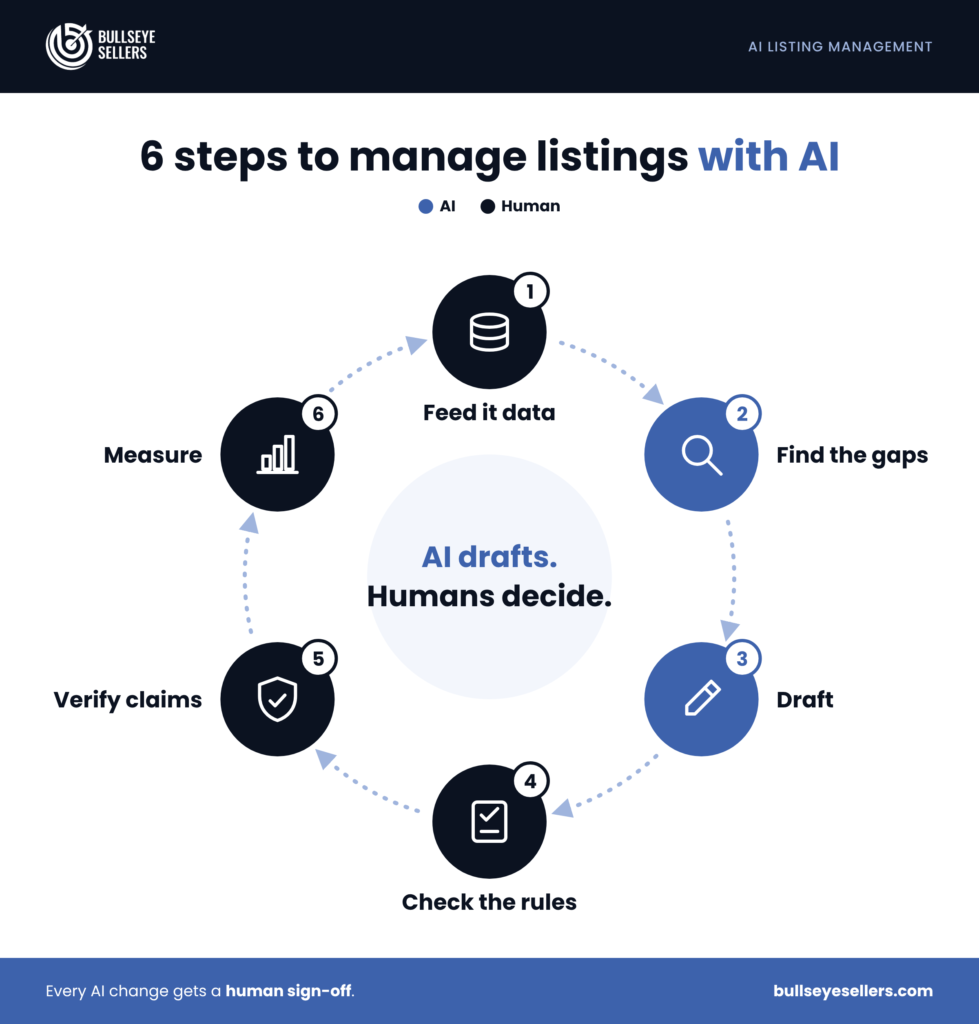

Step 1: Give the AI real data
AI writes generic copy when it only has your product name. Before asking for anything, export the data that shows how shoppers find and judge your listing.
Start with these four sources:
- Search Query Performance (Brand Analytics): impressions, clicks, add-to-carts and purchases by search term
- Search term report (Amazon Ads): the actual queries that triggered your ads and converted
- Your reviews and customer questions: the words buyers use, and the objections they raise
- Your verified product facts: dimensions, materials, certifications and what’s in the box
Step 2: Let AI find the gap
Ask the AI to diagnose before it writes. Paste in your data and current listing, then ask which high-converting search terms are missing from your title, Item Highlights and bullets, and which customer complaints your copy never addresses.
The most valuable signal is a conversion gap. That’s a term where you earn clicks but competitors win the purchase. It usually points to a listing problem, such as an unclear image or a missing detail, rather than a bidding problem.
Step 3: Generate drafts
Once you know what to fix, have AI draft two or three versions of each section. Amazon’s own tools work inside Seller Central. A general LLM like ChatGPT works anywhere, but only knows what you give it.
A prompt that keeps the AI grounded looks like this:
You are rewriting an Amazon listing. Use ONLY the product facts below.
Do not invent specifications, certifications or claims.
Title: 75 characters max, including spaces. Lead with the brand and core product.
Item Highlights: 125 characters max.
Bullets: 5 bullets, benefit first, then the supporting fact.
Priority keywords (from Search Query Performance): [list]
Product facts: [list]
Customer objections from reviews: [list]
Step 4: Check the drafts against Amazon’s current rules
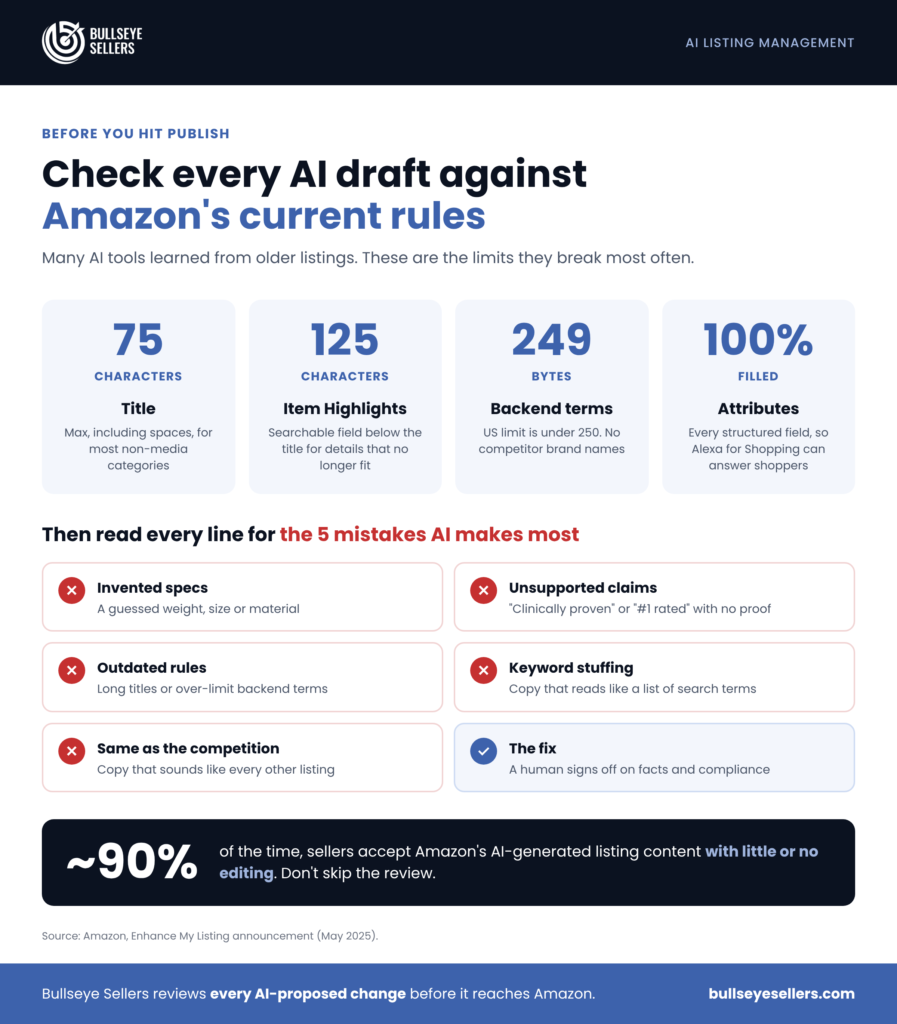
Many AI tools learned from older listings, so they still write long titles. Check every draft against the rules that apply now.
The checks that catch the most problems are:
- Title length: 75 characters or fewer, including spaces, for most non-media categories since July 27, 2026. Amazon may rewrite titles that run over.
- Item Highlights: a searchable field of up to 125 characters, shown below the title. Use it for the details that no longer fit in the title.
- Backend search terms: under 250 bytes in the US. Keep to 249, and leave out competitor brand names.
- Attributes: fill in every structured field. Amazon’s shopping assistant, Alexa for Shopping, draws on catalog data, reviews and Q&A to answer shoppers’ questions.
Our Amazon listing optimization checklist covers each rule in more detail.
Step 5: Verify every claim before you publish
This is the step most sellers skip. Read each AI-written line and ask whether you could prove it. Wrong measurements drive returns. Health, safety or “best-selling” claims you can’t support can get a listing flagged or suppressed.
Have the person who knows the product sign off on facts, and the person who knows Amazon sign off on compliance. On small teams, that’s often one person with two checklists.
Step 6: Measure, then keep or roll back
Change one major element at a time and give it 7 to 14 days. Compare unit session percentage, click-through rate and Search Query Performance purchase share against the period before the change.
If your brand is enrolled in Brand Registry, use Amazon’s Manage Your Experiments to A/B test titles, main images and A+ content instead of guessing. Keep the winner, roll back the loser, and feed the result into your next round of AI prompts.
How do you use Amazon’s Enhance My Listing?
Enhance My Listing is Amazon’s free generative AI tool for improving existing listings. It suggests updated titles, attributes and descriptions, and fills in missing details, using Amazon’s data on how customers engage with products.
To open it in Seller Central:
- Go to Inventory, then Manage All Inventory.
- Click the menu next to a listing and choose Edit Listing.
- On the Product Details tab, click Enhance My Listing.
Before you accept
Treat every suggestion as a draft. Run it through Steps 4 and 5 before you accept it, since a suggestion can still break the title limit or misstate a product detail.
Which AI tool should you use for Amazon listings?
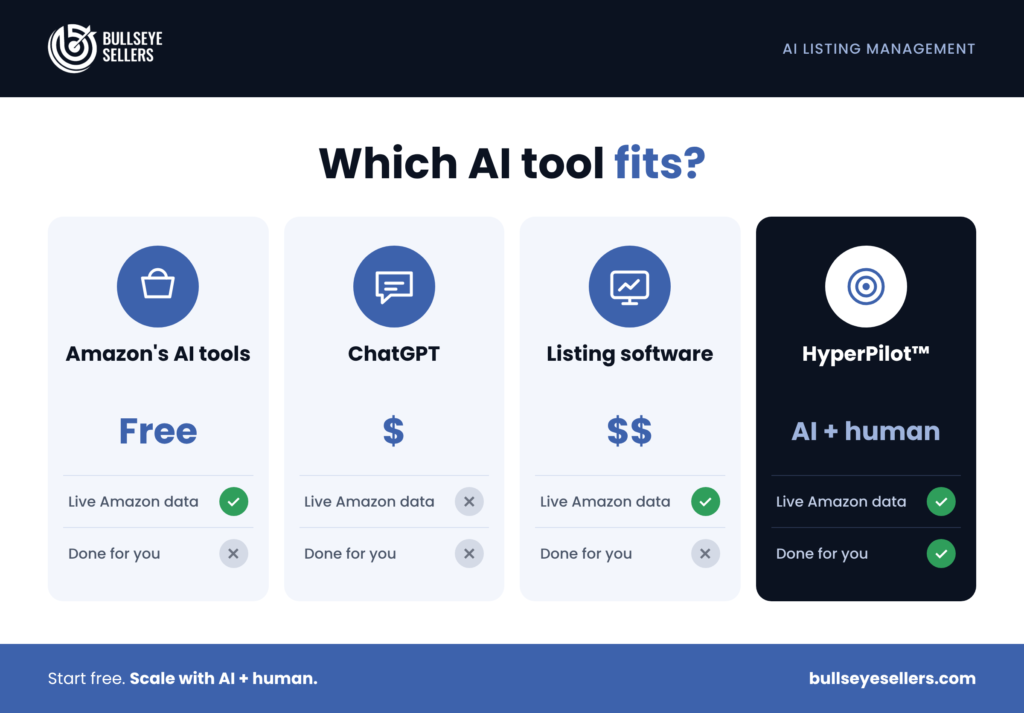

The right AI tool depends on how many listings you manage and how much live data the tool can see. Most brands end up combining Amazon’s free tools with one other option.
| Option | Best for | Uses live Amazon data? | Cost | Main risk |
| Amazon’s Gen AI listing tool and Enhance My Listing | Drafting new listings and refreshing existing ones inside Seller Central | Yes, Amazon’s own engagement data | Free | Easy to accept suggestions without checking them |
| ChatGPT or another general LLM | Rewrites, review mining and prompt-driven drafts | No, only what you paste in | Free to low monthly plans | Invents facts when given thin inputs; may not know current Amazon rules |
| Listing optimization software (e.g. Helium 10, DataDive) | Keyword research and listing scoring for in-house teams | Yes, through the vendor’s own data | Monthly subscription | Gives you data, but your team still makes every decision |
| AI plus human management (HyperPilot™) | Brands doing 6 to 8 figures that want continuous optimization handled for them | Yes, across every major Amazon report | Part of Bullseye Sellers management | Built for established brands, not for single-product sellers |
For a deeper look at self-serve software versus managed AI, see how HyperPilot™ compares with tools like Helium 10.
Where AI gets Amazon listings wrong
AI saves time, but its mistakes look convincing. These are the problems the Bullseye Sellers team catches most often when reviewing AI-written listings:
- Invented specs: a guessed weight, size or material that the product doesn’t have
- Unsupported claims: “clinically proven,” “#1 rated” or “eco-friendly” with nothing to back them up
- Outdated rules: titles over 75 characters, or backend terms over the byte limit
- Keyword stuffing: search terms repeated until the copy reads like a list
- Same as the competition: copy that sounds like every other listing because it was trained on them
Each of these is fixable at Step 5. None of them are fixable if the content goes live unread.

Frequently asked questions
Can I use ChatGPT to write my Amazon listing? Yes. ChatGPT can draft titles, bullets and descriptions quickly, but it only knows what you give it and may not know Amazon’s 2026 rules. Give it your verified product facts, priority keywords and character limits. Then check the draft against Amazon’s title, Item Highlights and backend rules before publishing.
Does Amazon penalize AI-written listings? Amazon builds generative AI writing tools into Seller Central, so using AI isn’t the problem. The risk is the content. A listing with inaccurate details, unsupported claims or an over-length title can be rewritten, suppressed or returned more often, whether a person or AI wrote it. Review every line before it goes live.
What is Amazon’s Enhance My Listing? Enhance My Listing is a free generative AI tool in Seller Central that suggests improvements to existing listings, including titles, attributes, descriptions and missing details. It’s based on Amazon’s data about how customers engage with products. Open it from Manage All Inventory by choosing Edit Listing on a product.
How often should AI review an Amazon listing? Review your top listings at least monthly, and audit each one fully every 90 days. Check sooner after a rank drop, a new competitor or an Amazon policy change. At Bullseye Sellers, HyperPilot™ monitors client accounts 24/7, so changes are flagged as they happen rather than at the next audit.
Can AI manage Amazon listings without a human? AI can monitor listings, find problems and draft fixes on its own, but it shouldn’t publish changes without review. AI tools can invent product details or repeat outdated rules with complete confidence. At Bullseye Sellers, every AI-proposed change goes through a human strategist before it reaches Amazon.
Bullseye Sellers · HyperPilot™
Using AI to manage Amazon listings works when the AI does the heavy analysis and a person makes the final call. Want that system running on your account? Book a call with Bullseye Sellers and our team will show you what HyperPilot™ finds in your listings and what we’d fix first.
24/7 account monitoring10,000+ data points a day100+ Bullseye SOPs100% human-approved changes
Get Bullseye Sellers’ Amazon and TikTok Shop updates first in Google Search.